


Choose the Right AI Assistant: Scorecards, Safety, Fit

Choosing the Right AI Assistant Without the Guesswork
Choosing an AI assistant can feel overwhelming because the “best” option depends on how work actually gets done, what data is involved, and which tools need to connect. A practical way to narrow the field is to treat it like matchmaking: define the jobs to be done, set non-negotiables for quality and safety, confirm privacy and compliance fit, then compare finalists with a simple scorecard.
If you want a ready-to-use framework you can reuse each time tools change, see The Ultimate AI Assistant Matchmaker: The Ultimate Guide to Choosing the Right AI Assistant.
Start with the jobs the assistant must do
Begin by listing the top five tasks you want help with—ranked by frequency and business value. Common examples include drafting emails, producing meeting notes, summarizing research, suggesting customer support replies, or cleaning up data. Next, note where the assistant must live: a browser tab, mobile app, desktop app, Slack/Teams, a CRM, a helpdesk, an IDE, or internal tools.
Separate “must-have” outcomes (accuracy, speed, consistent tone, correct formatting) from “nice-to-have” benefits (creative flair, humor, optional layouts). Finally, document constraints early—regulated industry requirements, sensitive data exposure, team-wide usage, required audit trails, or cases where on-device processing is needed.
| Task type | Example output | Key capability to prioritize | Common pitfalls |
|---|---|---|---|
| Writing & editing | Email drafts, proposals, style rewrites | Tone control, templates, versioning | Overconfident claims, inconsistent voice |
| Research & summarization | Briefs, comparisons, citations | Source handling, citation support | Hallucinated facts, stale info |
| Meetings & notes | Action items, decisions, follow-ups | Transcription quality, diarization, exports | Missing action items, privacy concerns |
| Customer support | Suggested replies, macro expansion | Knowledge base grounding, guardrails | Incorrect policy responses, escalation gaps |
| Automation | Ticket routing, data entry, workflows | Integrations, triggers, approvals | Silent failures, runaway automations |
Pick the right assistant “type” for your workflow
Different assistant types shine in different environments. Matching the type to your workflow prevents paying for features you can’t use—or skipping features you truly need.
- General-purpose chat assistants: Great for flexible drafting, brainstorming, and quick Q&A. They often need additional connections to be useful inside business processes.
- Work-app assistants: Embedded directly in email, docs, CRM, or support desks. Best when speed, consistent formatting, and repeatability matter inside a specific tool.
- Agentic assistants: Designed to plan and execute multi-step tasks (search, draft, update systems) using tools—ideally with approvals. Best for repeatable operations and workflows.
- Specialized assistants: Tuned for a niche like coding, design, legal review, analytics, or support. Best when domain accuracy matters more than breadth.
Define your non-negotiables: quality, safety, and control
Quality is easiest to judge when you test your real tasks. Bring examples: a few representative emails, a typical support ticket, a standard meeting agenda, or a short research question. Evaluate outputs for clarity, correctness, and whether the voice matches your organization.
Privacy, data handling, and compliance checkpoints
Security controls should include encryption, access logs, SSO/SAML support, role-based permissions, and auditable admin actions. For compliance fit, map your requirements to recognized frameworks—such as the NIST AI Risk Management Framework (AI RMF 1.0)—and confirm your vendor review process aligns with internal risk management. If your organization runs ISO-aligned security programs, ISO/IEC 27001 provides a useful baseline for assessing information security management practices.
Integrations and setup effort: where most “wins” come from
For teams exploring AI across different domains (including consumer applications), pairing workflows with clear inputs can help. For example, How AI Can Personalize Your Pet’s Diet – Smart Nutrition Guide for Healthier Pets shows how structured data and consistent rules improve outcomes in a specialized use case.
A simple scoring method to compare assistants
| Category | Weight | What to test quickly |
|---|---|---|
| Task quality | 30% | Use 10 real tasks; check accuracy, tone, formatting |
| Privacy & retention | 20% | Retention policy, training use, access controls, logs |
| Integrations | 15% | Native connectors, API actions, exports/imports |
| Grounding & sources | 15% | Internal docs retrieval, citations, source transparency |
| Team controls | 10% | Roles, shared templates, approvals, guardrails |
| Cost predictability | 10% | Seat pricing vs usage pricing; overage controls |
Common buying mistakes to avoid
A guided match: use a decision framework you can reuse
A reusable decision framework makes future upgrades simpler. Match assistant types to tasks, risk levels, and tooling constraints; apply consistent privacy and evaluation checklists; and document role-based usage rules (including when human review is required). If you want a compact, repeatable way to run the entire process—from requirements to scorecard—use The Ultimate AI Assistant Matchmaker: The Ultimate Guide to Choosing the Right AI Assistant as a working template.
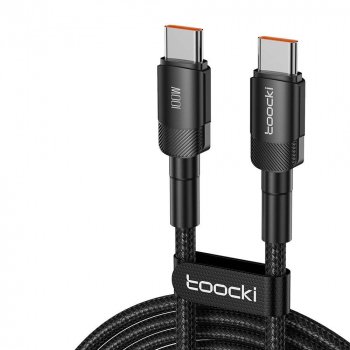
For reliable piloting sessions, make sure the team’s hardware and connectivity don’t become friction points. A simple accessory like the 100W USB-C to USB-C Fast Charging Cable with PD 3.0 & QC 4.0 – 5A Power can help keep laptops and tablets ready during heavy testing days.
FAQ
What’s the difference between a chatbot, an AI assistant, and an AI agent?
A chatbot focuses on conversation and Q&A, an AI assistant supports tasks inside your workflow (often with templates and tool connections), and an AI agent can plan and execute multi-step actions using tools. Approvals and audit logs are key when agents can take actions that affect systems or customers.
How can an AI assistant be evaluated without exposing sensitive information?
Use synthetic or redacted test data, a controlled prompt set, and a limited-access pilot environment. Avoid regulated or customer-identifiable data until retention, training-use settings, and access controls are confirmed in writing.
Which features matter most for a team rollout?
Prioritize SSO/RBAC, shared templates, audit logs, knowledge-base permissions, and admin controls for policy enforcement. A lightweight governance process for high-stakes use (review, approvals, escalation) helps the rollout scale safely.










Leave a comment