


100W USB‑C to USB‑C Cable: PD 3.0, QC 4.0 Explained

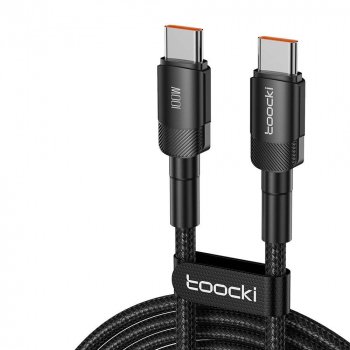
100W USB‑C to USB‑C Fast Charging Cable (PD 3.0 & QC 4.0, 5A): What It Supports and How to Use It
A high-power USB‑C to USB‑C cable can be the difference between slow top-ups and true fast charging for phones, tablets, and laptops. A 100W (5A) cable is built to work with USB Power Delivery (PD 3.0) and Qualcomm Quick Charge (QC 4.0) setups, while also handling everyday data and charging needs across modern USB‑C devices. The key is understanding what the rating really means—and how to pair it with the right charger and device.
What “100W / 5A” means in real use
When a cable is labeled “100W,” that’s the maximum power it can safely carry under the right conditions. Power (watts) is calculated by voltage × current, and USB‑C fast charging commonly uses higher voltage profiles (like 20V) to deliver laptop-class power.
- “100W” is the ceiling, not a guarantee. You’ll only approach 100W when the charger supports it and the connected device can request it (typical for many USB‑C laptops and some tablets).
- “5A” indicates high-current capability. Many basic USB‑C cables are limited to 3A, which can cap charging at lower wattages depending on the negotiated voltage/current profile.
- Charging speed depends on the full chain. Charger output, device limits, charging protocol negotiation (PD/QC), and cable rating all must align.
- Phones usually draw far less than 100W. The practical benefit for phones is broad compatibility, stability, and headroom (helpful if you upgrade devices later).
PD 3.0 vs QC 4.0: how fast charging is negotiated
Fast charging isn’t “pushed” by a cable—it’s negotiated between the charger and the device. The cable’s job is to reliably carry the requested power and support the communication needed for safe negotiation.
- USB Power Delivery (PD) is the USB‑C standard that negotiates power profiles (voltage/current combinations) so a device can request what it needs efficiently.
- Qualcomm Quick Charge (QC) is a fast-charging family often found on compatible Android devices and chargers. QC 4.0 aligns more closely with USB‑C practices and adds safety/efficiency improvements.
- A cable can’t “add” fast charging. If your phone or laptop doesn’t support PD or QC (or your charger doesn’t), the system falls back to a slower but safe mode.
- Most modern USB‑C setups fall back intelligently. When both ends support PD, that typically becomes the preferred common standard.
For additional background, see the official overviews from USB-IF on USB Power Delivery and Qualcomm on Quick Charge.
Compatibility checklist before buying
Before choosing a USB‑C to USB‑C cable for high-speed charging, check these basics to avoid mismatches that lead to slow charging or no connection.
- Device port: This is USB‑C to USB‑C. Both your charger and device must have USB‑C ports. It won’t plug into USB‑A without an adapter (and adapters can reduce charging capability).
- Charger type: For laptops and higher-power tablets, use a USB‑C PD wall charger with adequate wattage (common options: 45W, 65W, 100W).
- Device requirements: Some laptops need specific PD profiles to avoid “slow charger” warnings. Some phones support PD plus proprietary fast-charge modes; they’ll still charge, but speeds vary.
- Plan for headroom: Pairing a 100W-capable cable with a quality 100W PD charger offers the widest compatibility—even if your current device doesn’t use the full output.
Specifications at a glance
For a quick “what to expect” snapshot, this table summarizes typical real-world outcomes when using a 100W (5A) USB‑C to USB‑C cable in a modern charging setup.
Cable capability overview (typical expectations)
| Feature | What to expect | Why it matters |
|---|---|---|
| Max power rating | Up to 100W (5A) with compatible PD charger/device | Enables laptop-class charging and helps prevent cable-limited bottlenecks |
| Fast-charging support | Works within PD 3.0 / QC 4.0 compatible charging chains | Improves the odds of reaching the best available charging mode |
| Connector type | USB‑C to USB‑C | Designed for modern USB‑C chargers/devices; not compatible with USB‑A ports directly |
| Real-world speed | Depends on charger + device limits | Even a 100W cable can’t exceed what the charger and device negotiate |
Common use cases
Safety and longevity tips
When a 100W cable is the right choice (and when it isn’t)
Recommended products (in stock)
- 100W USB-C to USB-C Fast Charging Cable with PD 3.0 & QC 4.0 – 5A Power
- Cotton Sleeping Bag Liner
- What to Do When Your Car is Overheating | Practical Emergency Car Care eBook
FAQ
What is the difference between USB-C PD and QC?
USB‑C Power Delivery (PD) is a USB‑C standard that negotiates safe voltage/current power profiles between a charger and a device. Quick Charge (QC) is a Qualcomm fast-charging family that also increases charging power, but it requires QC compatibility on both the charger and the device and may fall back to the best shared standard when needed.
What is A QC fast charger?
A QC fast charger is a charger that supports Qualcomm Quick Charge profiles to deliver higher charging power to compatible devices. QC versions vary, so charging speed depends on whether your phone and charger share the same (or compatible) QC standard.
Do you need A special USB-C cable for PD?
PD works best with properly rated USB‑C cables, and higher-wattage charging may require a 5A/100W-capable cable. If a cable is limited to lower current, it can reduce charging speed even when the charger and device support faster PD modes.











Leave a comment